Lenovo
Uncategorized

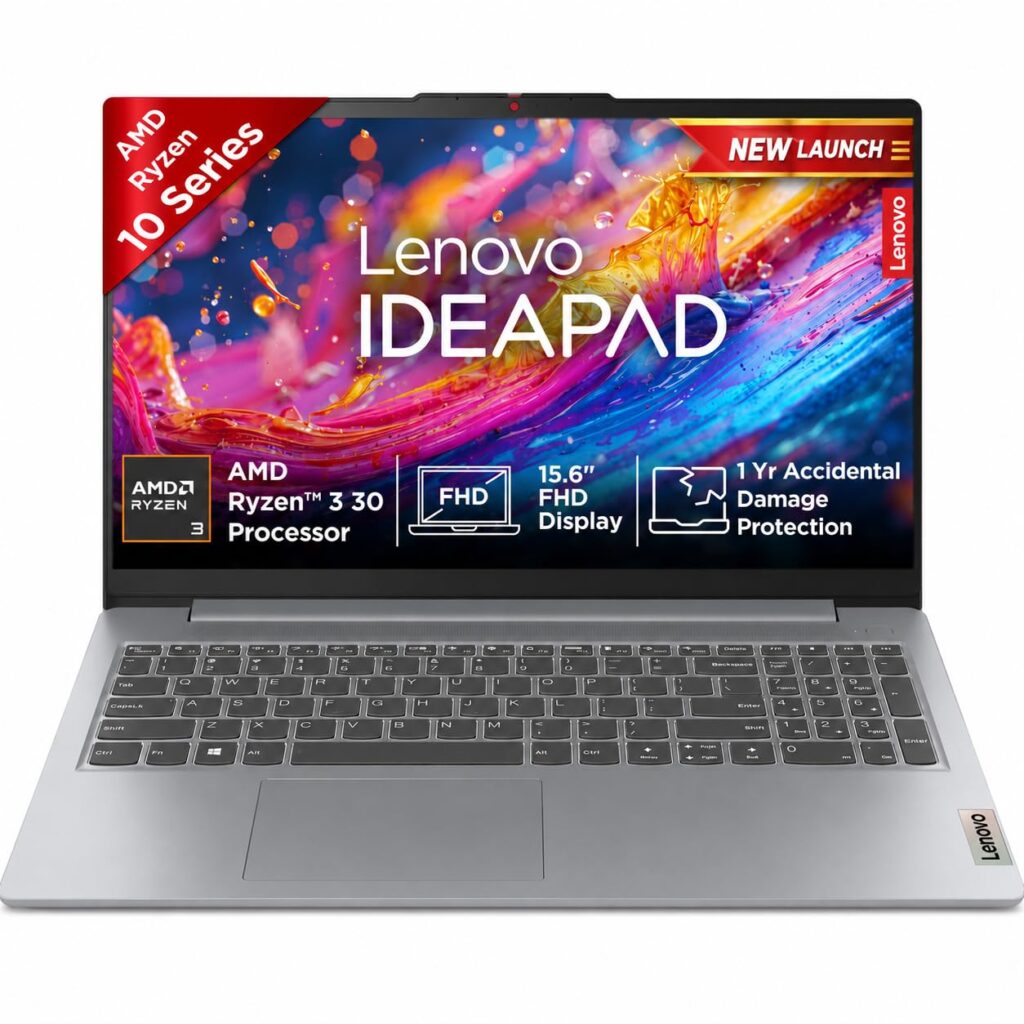
Want to buy new laptop under 50K?

If you’re looking for a laptop that balances everyday performance, portability, storage, and productivity features without moving into a premium price segment, the Lenovo IdeaPad Slim 3 is worth considering. This model combines an AMD Ryzen 3 processor, 8GB RAM, a 512GB SSD, a 15.6-inch Full HD display, and Windows 11 in a relatively lightweight design. With its 1.6 kg weight, slim profile, and included Office 2024, the laptop is aimed at students, home users, professionals, and anyone who primarily needs a dependable machine for browsing, documents, online classes, entertainment, and routine multitasking. 1. Everyday Performance with AMD Ryzen 3 The Lenovo IdeaPad Slim 3 is powered by an AMD Ryzen 3 processor, making it suitable for common computing tasks. Whether you’re working with Word documents, browsing the web, attending video meetings, checking emails, or streaming content, the processor is designed around everyday usability rather than demanding professional workloads. For students and home users, this makes the laptop a practical choice. It can handle several everyday applications at once, although users who regularly work with intensive video editing, advanced 3D applications, or other demanding software should consider a more powerful processor. 2. 8GB RAM for Everyday Multitasking The laptop comes with 8GB of RAM, which is a sensible memory capacity for general-purpose Windows computing. You can comfortably use applications such as web browsers, Microsoft Office programs, PDF readers, communication apps, and media players for typical daily tasks. For students, office workers, and casual users, 8GB provides a useful balance between performance and cost. If your work involves particularly heavy multitasking or memory-intensive applications, however, a higher-memory configuration may be more appropriate. 3. 512GB SSD Offers Fast and Convenient Storage One of the strong points of this configuration is its 512GB SSD. Compared with traditional hard drives, an SSD can provide faster system responsiveness, quicker application loading, and faster file access. The 512GB capacity also gives you plenty of room for documents, photos, presentations, software, and other everyday files. For users moving from an older HDD-based laptop, the difference in responsiveness can be particularly noticeable. 4. 15.6-Inch Full HD Display The IdeaPad Slim 3 features a 15.6-inch (39.6 cm) Full HD display, giving users a relatively spacious workspace. The larger screen is useful when working on spreadsheets, documents, presentations, or multiple browser tabs. It also makes the laptop comfortable for watching movies and other video content. The Full HD resolution provides a sharper viewing experience than lower-resolution panels, making text and images easier to work with during everyday use. 5. AMD Radeon 610M Graphics For graphics, the laptop uses AMD Radeon 610M Graphics. This integrated graphics solution is intended primarily for everyday visual tasks, multimedia, casual gaming, and standard productivity rather than demanding AAA gaming or professional graphics work. If you’re buying this laptop for studies, office work, web browsing, entertainment, and light graphical workloads, the graphics hardware should fit that purpose well. Dedicated gaming laptops remain the better option for users who want high-performance gaming. 6. Windows 11 and Office 2024 Another major convenience is the inclusion of Windows 11 and Office 2024. Windows 11 provides a modern desktop environment with updated productivity features and a refreshed interface. Meanwhile, Office 2024 is particularly useful for students and professionals who regularly work with documents, spreadsheets, presentations, and other Office-based tasks. Having these productivity tools included can make the laptop ready for work and study straight out of the box. 7. Thin and Light Design Despite having a relatively large 15.6-inch display, the Lenovo IdeaPad Slim 3 weighs around 1.6 kg. That makes it more convenient to carry between home, college, the office, or a café. The grey finish also gives the laptop a clean and understated appearance that should suit both professional and personal environments. For users who want a larger display without carrying an especially heavy machine, this combination is appealing. Who Should Buy the Lenovo IdeaPad Slim 3? This Lenovo laptop can be a good fit for: Who Should Consider Another Laptop? The IdeaPad Slim 3 may not be the ideal choice if your primary requirements include: For those tasks, it would be worth looking at a laptop with a more powerful Ryzen/Core processor, more RAM, and dedicated graphics.
Uncategorized

Smart Air Purifier for your living room

Indoor air quality has become an important part of creating a comfortable and healthy home environment. Dust, fine particles, allergens, odors, and other airborne pollutants can affect the air we breathe every day. This is where a reliable air purifier can make a useful addition to your home. The Philips AC4221 Smart Air Purifier for Home is designed to provide efficient air purification while fitting naturally into modern living spaces. With its sleek metallic design and smart functionality, it can be a practical choice for rooms such as living rooms, bedrooms, and other frequently used areas. What Makes the Philips AC4221 Stand Out? The Philips AC4221 combines air purification technology with a contemporary design. Instead of being just another appliance in the room, its metallic finish gives it a modern appearance that can complement a variety of home interiors. Its smart features are designed to make everyday air-quality management more convenient. Depending on the operating mode and surrounding air conditions, the purifier can help maintain cleaner indoor air without requiring constant manual adjustment. https://link.amazon/B0cnmh7c1

Sony
Gadget Reviews

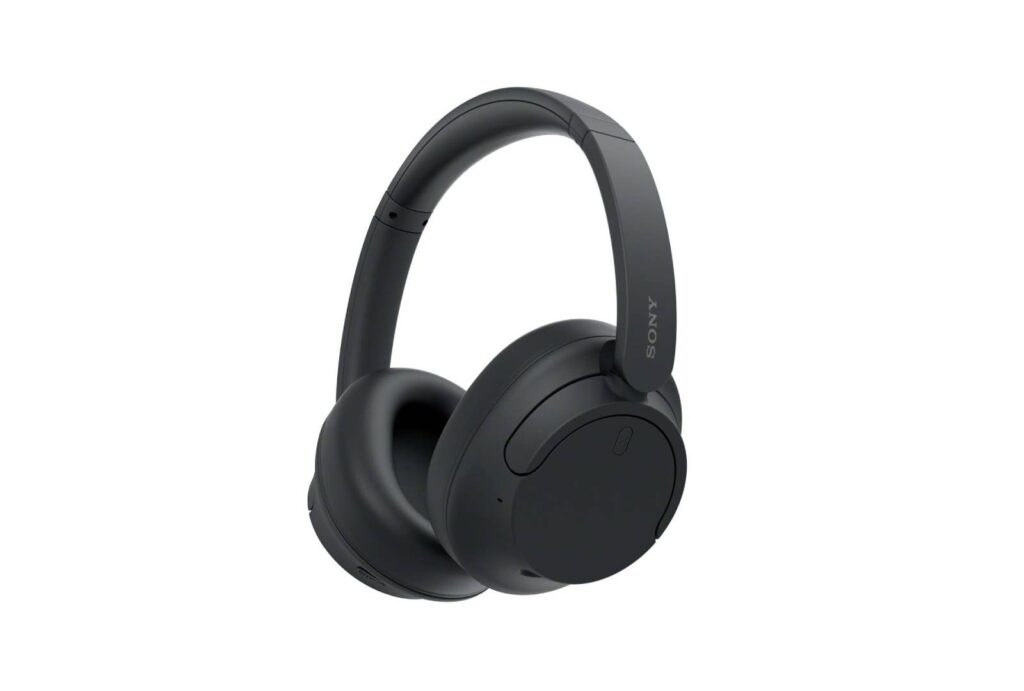
Sony WH-CH720N Review: The Headphone That Made Me Fall in Love With Music Again

Why I Bought the Sony WH-CH720N Music has always been a big part of my life. I genuinely enjoy listening to music, and sometimes I even like singing myself. So, for me, headphones aren’t just another gadget. Good sound actually makes a difference to how I enjoy my music. Before buying the Sony WH-CH720N, I was using a wired headphone from a Chinese brand. It wasn’t a bad headphone, and I was reasonably happy with it, but deep down, I knew I wanted something better. Then one day, one of my friends suggested that I try the Sony WH-CH720N. He actually gave me his headphone to listen to for a while, and that’s where things changed. My First Experience With the Sony WH-CH720N The first time I put the headphones on and played music, I was genuinely impressed. I wouldn’t call myself an audio expert who can explain every technical detail about sound, but I know what I enjoy hearing. And compared to my old wired headphone, the difference was immediately noticeable to me. The sound felt much better, more enjoyable, and simply more pleasurable to listen to. It was almost a love-at-first-listen moment for me. I remember thinking, “Okay, this is the kind of headphone I want.” That experience was actually the main reason I decided to buy one for myself. What I Like About It One of the first things I noticed was the comfort. Since I enjoy listening to music for quite some time, comfort is important to me. The WH-CH720N feels comfortable to wear, and I don’t get the feeling that I’m wearing something unnecessarily heavy on my head. I also like the way it looks. The design is simple, stylish, and doesn’t feel overly flashy. For me, that’s a good thing because I can wear it casually without feeling like I’m carrying a huge piece of technology on my head. And then there are all the features that come with it, which make the overall experience feel much more complete than what I was used to with my old wired headphone. More Than Just a Headphone for Me The reason I enjoy the Sony WH-CH720N isn’t really because it’s a Sony product or because it has a long list of features. It’s because music matters to me. When I put these headphones on, I can simply sit back and enjoy the songs I love. Sometimes I’m listening casually, and sometimes I’m paying attention to every little part of the music. That difference in experience compared to my old headphone is what made this purchase worthwhile for me. If you continue telling me what you personally experienced with sound quality, bass, ANC, battery, calls, comfort after long hours, Bluetooth, app/features, and anything you disliked, I’ll weave those into the same personal voice rather than turning it into a generic Sony specification article.

iPhone 17 Sage Green
Smartphones

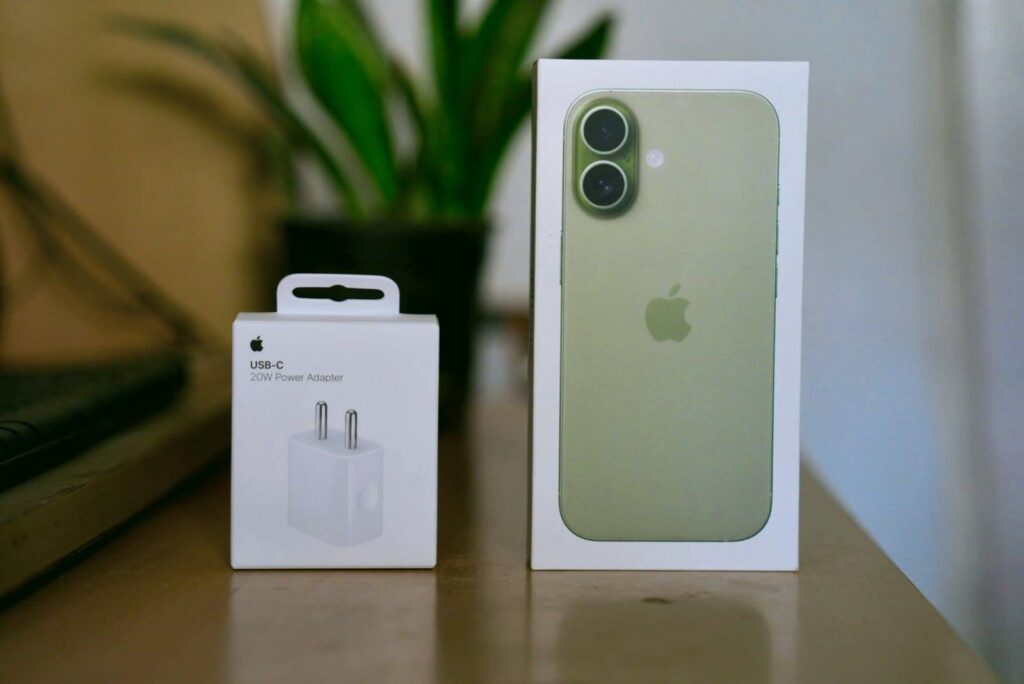
iPhone 17 Sage Green Review: My Honest Experience After Buying Apple’s Latest Smartphone

Introduction Buying a new smartphone is always exciting, but for me, buying the iPhone 17 in Sage Green feels a little more special. For most of my smartphone journey, I’ve been an Android user. I’ve used Android phones for years, so moving to an iPhone is actually a pretty big change for me. Interestingly, I’ve liked the iPhone since I was young. I remember looking at iPhones and thinking how beautiful and different they felt, but for one reason or another, I always ended up using Android. Now, after all these years, I finally have an iPhone 17 in my hand. And honestly, there’s a small sense of achievement in that. This isn’t just a review based on specifications. I wanted to share what it actually feels like for someone who has spent years using Android and is now experiencing the iPhone for the first time. This is not a sponsored review. I bought the phone myself, and the opinions in this article are based on my personal experience. My Experience Moving From Android to iPhone This is probably the most interesting part of the iPhone 17 experience for me. After using Android for so many years, I naturally had certain habits. I knew where everything was, how to change settings, how to manage files, and how to do things without thinking too much. With the iPhone, some things felt different initially. I had to spend a little time getting used to iOS and finding things that I could do almost automatically on Android. But surprisingly, I started getting comfortable with it quite quickly. What I like is how simple and polished the overall experience feels. Things don’t feel unnecessarily complicated, and after using it for some time, I started understanding why so many people enjoy the iPhone experience. I’m still discovering little things about iOS, so I wouldn’t say I’ve completely moved away from my Android habits yet. But that’s also what makes this experience interesting for me. After years of using Android, finally having an iPhone in my hand feels genuinely good. Design and Build Quality Apple has once again done an excellent job with the design. The aluminium frame feels sturdy, and the back panel has a premium finish that doesn’t easily attract fingerprints. The phone feels comfortable in hand despite its premium build. Things I liked: Rating: ⭐⭐⭐⭐⭐ (5/5) Display Quality The display is one of my favourite parts of the iPhone 17. Whether I was watching YouTube videos, browsing social media, or editing photos, everything looked sharp and vibrant. Colours appear natural, and the brightness is more than enough for outdoor usage. Scrolling feels smooth, and the overall experience is excellent. If you enjoy watching movies or Netflix on your phone, you won’t be disappointed. Rating: ⭐⭐⭐⭐⭐ (5/5) Performance The iPhone 17 handles everything effortlessly. I tested it with: The phone remained smooth throughout my usage. Apps open quickly, multitasking is seamless, and I haven’t noticed any lag. Even while editing videos and photos, the performance remained consistent. Camera Performance One of the biggest reasons people buy an iPhone is the camera, and I can understand why. Daylight Photos Photos come out sharp with accurate colours. Unlike some phones that oversaturate images, the iPhone keeps the colours natural. Portrait Mode Portrait shots look impressive with clean background blur and accurate edge detection. Night Photography Low-light performance is also very good. The phone captures enough detail while keeping noise under control. Video Recording As someone interested in content creation, I was especially impressed with the video quality. The stabilisation is excellent, making handheld videos look smooth. If you’re a YouTuber, Instagram creator, or someone who records family memories, you’ll enjoy using this camera. Rating: ⭐⭐⭐⭐⭐ (5/5) Battery Life Battery performance has been reliable in my daily usage. My routine usually includes: With this usage, the battery comfortably lasts throughout the day. Fast charging is useful whenever I need a quick top-up before going out. iOS Experience One thing I appreciate about iPhones is how polished iOS feels. Everything is simple, responsive, and well-optimised. Features like: make everyday usage convenient. If you’re switching from Android, it may take a few days to adjust, but once you get used to iOS, the experience feels smooth and consistent. Gaming Performance I also tried a few popular games to see how the phone performs. Games loaded quickly, and gameplay remained smooth. The phone handled longer gaming sessions without any major issues. Although I don’t play games every day, I found the performance more than enough for casual and even demanding games. Things I Loved ✔ Premium design ✔ Beautiful Sage Green colour ✔ Excellent camera ✔ Smooth performance ✔ Bright and vibrant display ✔ Reliable battery life ✔ Long-term software updates ✔ Excellent video recording ✔ Great overall user experience Things That Could Be Better No smartphone is perfect. Here are a few things that I think Apple could improve: These aren’t deal-breakers, but they’re worth keeping in mind. Is the iPhone 17 Worth Buying? In my opinion, the answer is yes, especially if you: If you’re looking for the cheapest smartphone, this may not be the right choice. But if you’re investing in a device for the long term, the iPhone 17 offers a premium experience. Final Verdict After spending time with the iPhone 17 (Sage Green), I can confidently say that I’m happy with my purchase. The phone combines elegant design, powerful performance, an excellent camera system, and a polished software experience into one package. Whether you’re a student, professional, content creator, or someone who simply wants a dependable flagship smartphone, the iPhone 17 is a strong option. While it is a premium device with a premium price tag, the overall experience justifies the investment for users who value quality, performance, and long-term reliability. My Ratings Feature Rating Design & Build ⭐⭐⭐⭐⭐ Display ⭐⭐⭐⭐⭐ Camera ⭐⭐⭐⭐⭐ Performance ⭐⭐⭐⭐⭐ Battery ⭐⭐⭐⭐☆ Software ⭐⭐⭐⭐⭐ Value for Money ⭐⭐⭐⭐☆ Overall Rating ⭐ 4.9/5

OnePlus Nord Buds 3R
Gadget Reviews

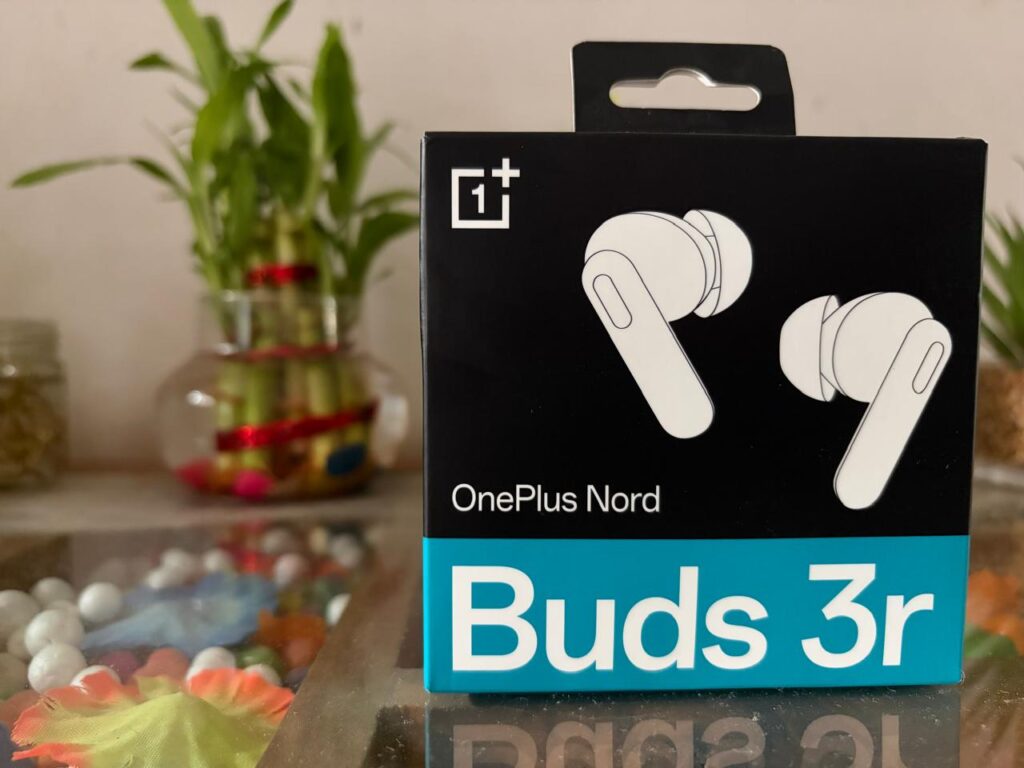
OnePlus Nord Buds 3R Review: Are They Worth Buying in 2026?

Introduction Wireless earbuds have become an essential gadget for almost everyone. Whether you are attending online meetings, listening to music, watching YouTube, or playing games, a good pair of earbuds can make a big difference. Recently, I bought the OnePlus Nord Buds 3R (Aura Blue), and after using them for several days, I decided to share my honest experience. In this review, I’ll cover everything you need to know, including design, sound quality, battery life, gaming performance, microphone quality, and whether these earbuds are worth buying. If you’re planning to purchase earbuds under the ₹3,000–₹3,500 price range, this review may help you make the right decision. Specifications at a Glance Feature Details Driver Size 12.4 mm Titanized Drivers Battery Backup Up to 54 Hours (with charging case) Bluetooth Bluetooth 5.4 Gaming Mode 47 ms Ultra Low Latency Water Resistance IP55 Noise Cancellation AI Dual-Mic Call Noise Cancellation Audio Feature 3D Spatial Audio Charging Port USB Type-C Unboxing Experience The earbuds come in OnePlus’ signature red box, giving a premium first impression. Inside the box, you’ll find: The packaging is neat and includes everything needed to get started. Design & Build Quality I purchased the Aura Blue colour variant, and it looks stylish without being too flashy. The charging case feels compact and easily fits into a jeans pocket. The earbuds are lightweight and comfortable to wear. Even after using them for 2–3 hours while watching videos or working on my laptop, I didn’t feel any discomfort. The IP55 rating also provides protection against dust and light water splashes, making them suitable for workouts and daily use. Rating: ⭐⭐⭐⭐⭐ (5/5) Sound Quality This is where the OnePlus Nord Buds 3R really impressed me. The 12.4 mm titanized drivers produce a rich and balanced sound. The bass is punchy, which makes Bollywood songs, Punjabi tracks, and EDM enjoyable, but the vocals remain clear as well. I tested the earbuds with Spotify and YouTube, and the listening experience was consistently good across different music genres. The 3D Spatial Audio feature adds a wider soundstage for compatible content, making movies and concerts feel more immersive. Rating: ⭐⭐⭐⭐⭐ (5/5) AI Call Noise Cancellation I frequently use earbuds for phone calls and online meetings. The dual microphones with AI noise cancellation help reduce background noise, allowing the other person to hear my voice clearly. During indoor calls, the performance is excellent. On busy roads or in noisy environments, some background sounds may still be audible, but overall, the call quality is reliable for daily use. Rating: ⭐⭐⭐⭐☆ (4.5/5) Gaming Performance If you enjoy games like BGMI, Free Fire, or Call of Duty Mobile, the 47 ms low latency mode is a useful feature. I noticed very little delay between the game and the audio, making the experience smooth for casual gaming. Professional gamers may still prefer wired earphones, but for everyday gaming, these earbuds perform well. Rating: ⭐⭐⭐⭐☆ (4.5/5) Battery Life Battery backup is one of the biggest highlights of these earbuds. OnePlus claims up to 54 hours of total playback with the charging case. While actual battery life depends on volume levels and usage, I found it more than enough for several days of regular listening without needing to recharge the case. Fast charging is another useful feature. A short charging session provides enough power for hours of music playback. For students, office users, and travellers, the battery performance is definitely a strong advantage. Rating: ⭐⭐⭐⭐⭐ (5/5) Bluetooth Connectivity The earbuds use Bluetooth 5.4, and the connection remained stable throughout my testing. Pairing with my Android phone was quick and easy. Once connected, the earbuds automatically reconnected whenever I opened the charging case. I didn’t experience any random disconnections or pairing issues. Comfort for Daily Use Since I spend several hours working on my laptop, comfort is important to me. The Nord Buds 3R fit securely in my ears and stayed in place while walking and during light exercise. The lightweight design makes them suitable for long listening sessions. Pros Cons Should You Buy the OnePlus Nord Buds 3R? If your budget is around ₹3,000, I believe the OnePlus Nord Buds 3R offers excellent value for money. These earbuds are ideal for: If your priority is great sound quality, long battery life, and dependable daily performance, this is a solid choice. However, if Active Noise Cancellation (ANC) is your top requirement, you may want to consider earbuds that specifically include that feature. Final Verdict After using the OnePlus Nord Buds 3R, I can say that they are one of the best wireless earbuds in their price segment. The sound quality is enjoyable, the battery life is excellent, and the overall experience has been smooth for daily use. No product is perfect, but considering the price, OnePlus has delivered a well-balanced package. If you’re looking for reliable earbuds for music, calls, movies, and casual gaming, the Nord Buds 3R is definitely worth considering. Overall Rating: ⭐⭐⭐⭐☆ (4.7/5)

Scroll to Top